Application objects are used to classify traffic on the network and are made up of layer 7 signatures, TCP/UDP port numbers and port ranges, protocols, network objects, or DSCP marks. Application classification can be used to monitor traffic or to create application-specific policy. There are many predefined applications on the appliance. You can add applications that are not already in the list.
Applications can be created from L7 signatures, or TCP/UDP port numbers or ranges, or protocols, or DSCP marks, or network objects, or various combinations of these. The following are valid combinations:
Network objects cannot be used in conjunction with a layer 7 signature.

|
Note: When creating applications based on ports, any given port number can only be defined once for TCP and once for UDP. The same port number can be defined for TCP and UDP. For example, if you define an application object with a port range TCP 500-510, you cannot then define another application object on TCP port 505. However, you can define another application object with UDP port 505. You can define duplicate ports/port ranges if a network object is also specified. |
|---|
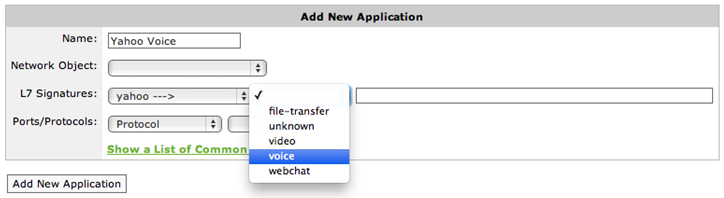
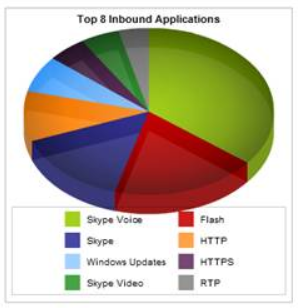
Many of the L7 signatures have sub-type classifications, which makes layer 7 visibility much more granular. For instance, for reporting on specific web applications, most vendors can only report on port 80 traffic. Exinda allows a deeper look into Layer 7 applications. For example, by comparison:
This allows you to monitor on a much more granular level.
 Where do I find this configuration?
Go to Objects > Applications > Applications.
To add a new application
Define an application to be based on one of the following:
Note that network objects cannot be used in conjunction with a layer 7 signature.
Select the Network Object for the application.
If the network object is internal, then traffic inbound to the LAN with the network object as a destination will be matched to this application, and traffic outbound from the LAN with the network object as the source will be matched to this application.
If the network object is external, then traffic inbound to the LAN with the network object as a source will be matched to this application, and traffic outbound from the LAN with the network object as the destination will be matched to this application.

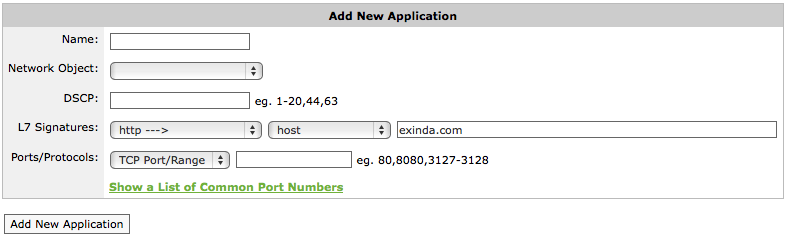
Select the DSCP mark for the application.
Multiple DSCP marks or DSCP mark ranges can be used by specifying a range using a dash (e.g. 1-20) and by using commas (e.g. 1-20,44,63)
Select the L7 Signature for the application.
Some layer 7 signatures have additional options that allow you to define application objects based on specific parts of that L7 signature. If a layer 7 signature is selected, specify the parameters for the signature.
For example, to create an application object that matches traffic to and from the Exinda.com website, in the L7 Signature field, select http --->, host, and type exinda.com.
In the Ports/Protocols controls, specify either TCP ports/port ranges, UDP ports/port ranges, or a layer 3 protocol.
Multiple ports and port ranges can be specified at the same time by comma separating values.
What L7 signature options are there?
Some Layer 7 signatures have additional options that allow you to define application objects based on specific parts of that L7 Signature. When configuring new application object, the L7 signatures followed by '--->' in the drop-list have additional options. Most provide options that you simply select from. Some require a selection plus additional information. The following table explains the various options that require more than simply picking an option.
| Layer 7 Signature | SubType | Description | ||||||||||||||||||||
|
citrix |
application |
Allows you to define an Application Object based on a published Citrix application name. |
||||||||||||||||||||
|
priority |
Allows you to define an Application Object based on a published Citrix priority. Citrix priorities are 0=High, 1=Medium, 2=Low, 3=Background. The Citrix priority detection will only work if Citrix is running without session-reliability, over TCP port 1494. |
|||||||||||||||||||||
|
user |
Allows you to define an Application Object based on the user running the Citrix published application. |
|||||||||||||||||||||
| ddl (direct download link) | host | Allows you to define an Application Object based on the 'host' field in the HTTP header. | ||||||||||||||||||||
|
flash |
host |
Allows you to define an Application Object based on the 'host' field in the HTTP header (where flash is running over http). |
||||||||||||||||||||
|
http |
content_type |
Allows you to define an Application Object based on the 'content-type' field in the HTTP header. |
||||||||||||||||||||
|
file |
Allows you to define an Application Object based on the filename requested in the HTTP URL. |
|||||||||||||||||||||
|
host |
Allows you to define an Application Object based on the 'host' field in the HTTP header. |
|||||||||||||||||||||
|
method |
Allows you to define an Application Object based on the HTTP method (e.g. GET PUT HEAD DELETE). |
|||||||||||||||||||||
|
user_agent |
Allows you to define an Application Object based on the 'user-agent' field in the HTTP header. |
|||||||||||||||||||||
| advanced |
Define custom criteria with the following syntax:
Examples:
|
|||||||||||||||||||||
| mpeg | host | Allows you to define an Application Object based on the 'host' field in the HTTP header (where mpeg is running over http). | ||||||||||||||||||||
| quicktime | host | Allows you to define an Application Object based on the 'host' field in the HTTP header (where quicktime is running over http). | ||||||||||||||||||||
| silverlight | host | Allows you to define an Application Object based on the 'host' field in the HTTP header (where silverlight is running over http). | ||||||||||||||||||||
| ssl |
common_name |
Allows you to define an Application Object based on the 'common name' field in the SSL certificate. |
||||||||||||||||||||
| advanced |
Define custom criteria with the following syntax:
|
|||||||||||||||||||||
| organization_name | Allows you to define an Application Object based on the 'organization' name field in the SSL certificate. | |||||||||||||||||||||
| spdy | This field should remain empty as any values typed here are ignored. | |||||||||||||||||||||
|
rtp |
codec |
Allows you to define an Application Object based on the 'codec' used in a RTP stream. |
||||||||||||||||||||
|
windowsmedia |
host |
Allows you to define an Application Object based on the 'host' field in the HTTP header (where windowsmedia is running over http). |
Example: How to create a custom application based on HTTPS protocol
Get the common name of the (https) SaaS site and create an application using the ssl L7 signature with the common name.
|
|
|